Deploy & place
Create deployments with replica counts, CPU and memory limits, environment variables, ports, and worker placement.
THE ZELA PLATFORM
Provision. Deploy. Connect. Observe. A practical set of tools for running Docker applications on servers you control.
APPLICATIONS
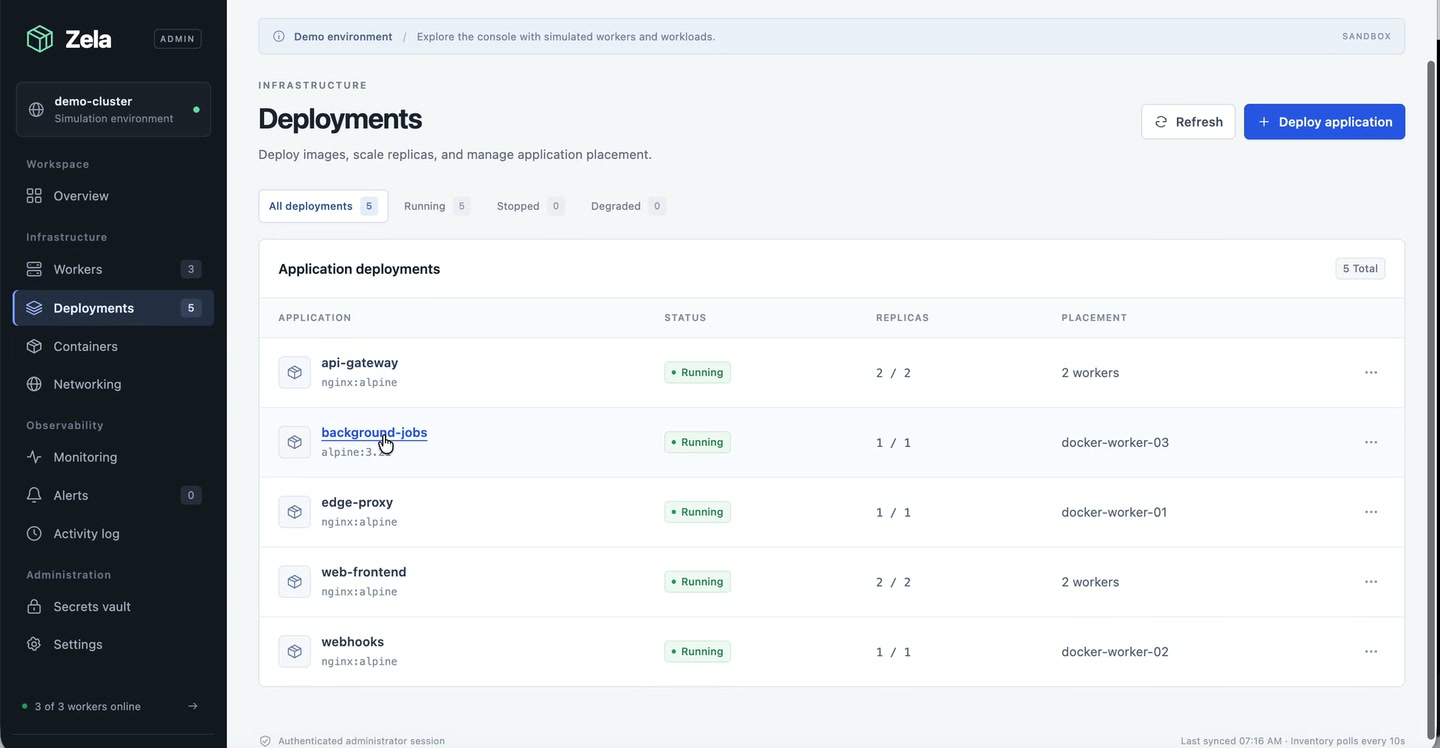
Deploy images to suitable workers, reserve resources, and follow each change through a durable operation. Keep a clear view of what is running and where.
 ACTUAL DASHBOARD · DEMO ENVIRONMENT
Create deployments with replica counts, CPU and memory limits, environment variables, ports, and worker placement.
Change replicas, roll out an image, or move eligible managed workloads. Startup checks run before retiring a source replica.
After a worker has been unseen for 60 seconds, eligible managed stateless replicas can be recreated on workers with capacity.
Inspect containers and logs. Start, stop, restart, and delete workloads, with status and errors in Activity log.
Recovery needs eligible capacity and placement. Moves and rollouts do not migrate volumes, local files, or in-memory connections.
Read the guideYOUR SERVERS
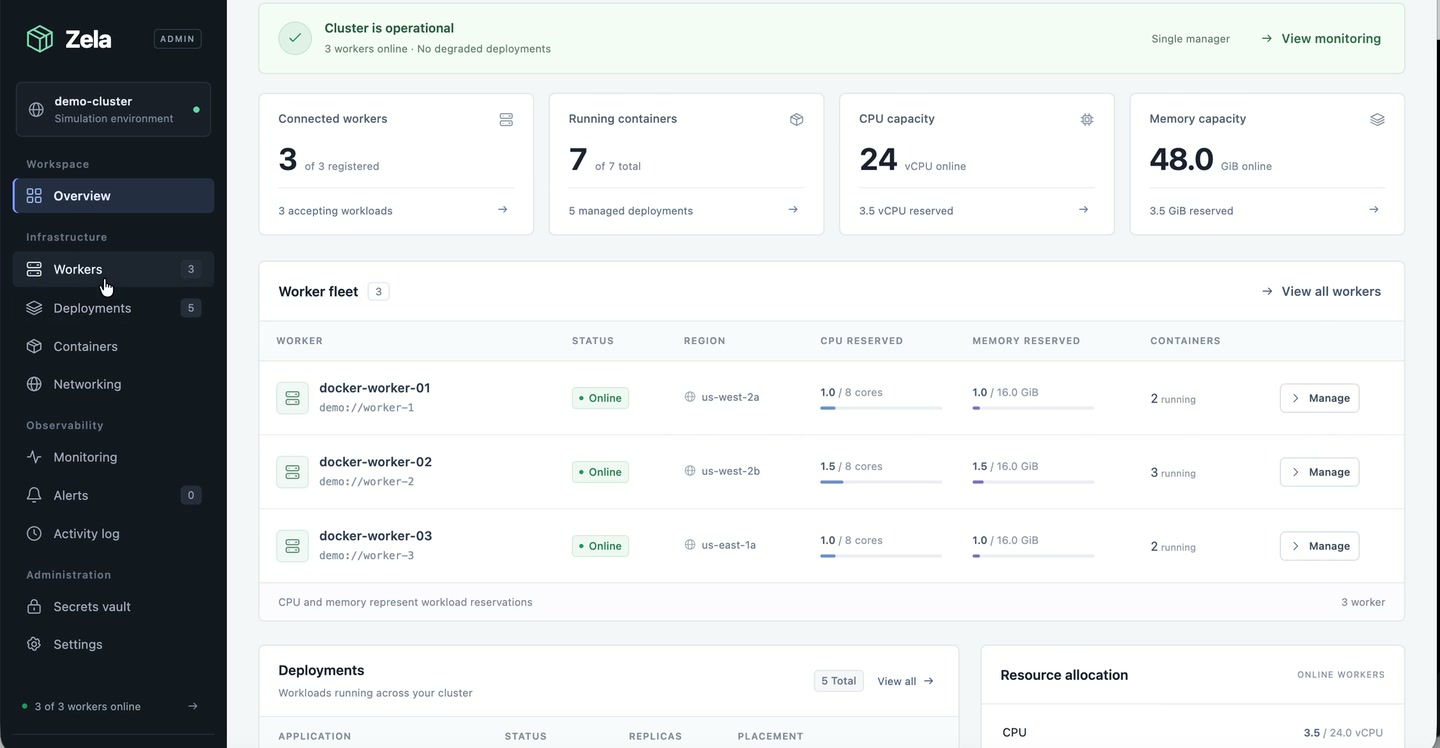
Turn existing Linux servers into workers. Use SSH provisioning for an installation Zela can manage, connect a TLS agent, or use a local Docker socket for a single-host setup.
 ACTUAL DASHBOARD · DEMO ENVIRONMENT
Install Docker and the worker agent on an existing supported Linux host. Pin its host key and use a saved SSH identity.
Pause new placements, drain eligible managed applications, activate scheduling, and unregister empty workers.
Automatic provisioning supports systemd hosts on RHEL, Rocky, AlmaLinux, CentOS Stream, Ubuntu, and Debian, on amd64 or arm64.
Update SSH-managed agents and verify connectivity while preserving worker credentials and running containers.
Provisioning does not create cloud servers. Local Docker socket connections do not provide host metrics or join the cluster mesh.
Read the guideCONNECTED BY DESIGN
Enable an optional WireGuard mesh across workers, then give managed services stable addresses and routes. Inspect Docker networks without losing sight of the cluster.
Private IPv4 /16 addressing, per-worker container subnets, peer endpoint overrides, apply status, and reapply controls.
Internal service names such as web.zela, stable service VIPs, and connection-based balancing across healthy replicas.
Publish host/path routes through worker edge proxies. Configure manual certificates or automatic ACME HTTP-01 issuance.
Inspect networks and endpoints, create local bridges, attach or detach standalone containers, and remove empty custom bridges.
The mesh needs prepared live Linux agents, reachable UDP ports, and Docker Engine 28+. Bridge networks are local to one worker. Public DNS and TLS issuance require configuration.
Read the guideNO GUESSWORK
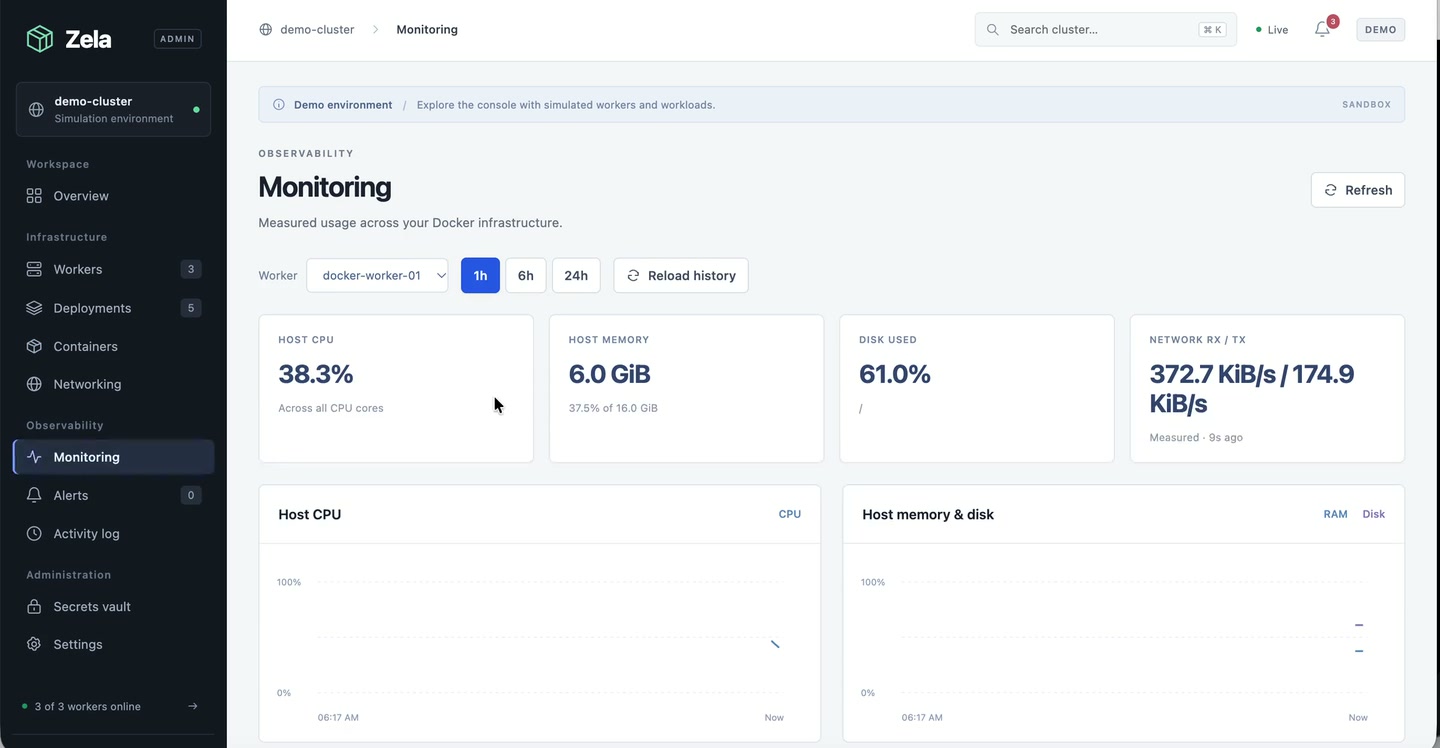
Separate what you reserved from what your servers actually use. Follow measurements, review alerts, and open the operation or container behind a notification.
 ACTUAL DASHBOARD · DEMO ENVIRONMENT
Measured CPU, memory, disks, network and disk I/O, with freshness and partial-collection indicators.
Select 1h, 6h, or 24h host history. Container history is retained for one hour. Gaps stay visible when samples are missing.
Configure sustained resource, offline, and health conditions. Acknowledge review separately from observed recovery.
Track operations, read a shared notification inbox, and optionally enable browser desktop notifications while the console is open.
Host metrics require an agent. Charts are snapshots, not a full record of every short-lived spike. Acknowledgement does not resolve an active condition.
Read the guideBROWSER. TERMINAL. ASSISTANT.
Operate through the dashboard, a remote CLI, Docker-compatible clients, or named MCP tools. Keep authentication and workload boundaries in the control plane.
Connect compatible cloud or local assistants over Streamable HTTP or stdio. Inspect health and logs, deploy, scale, and maintain workers.
Use read or management MCP credentials, browser OAuth, revocable access, and an allowlist for MCP provisioning hosts.
Use verified TLS, private profiles, JSON output, operation polling, worker provisioning, vault access, and monitoring commands.
Route supported Docker requests to their owning worker. Scoped integration tokens retain ownership boundaries; explicit worker selection supports local resources.
MCP management can change workloads across the cluster. It cannot edit cluster networking or access raw Docker, private-key contents, or token administration.
Read the guideCONTROL YOU CAN ACCOUNT FOR
Choose local file storage for a small single manager or PostgreSQL for durable shared state. Add backup managers when management availability matters.
Save workers, deployments, operations, monitoring, and access state. Startup applies database migrations and imports eligible JSON state into an empty database.
Optional PostgreSQL-coordinated leadership, readiness checks, and worker fencing support manager takeover.
AES-256-GCM protects saved SSH secrets. Use scoped, expiring, revocable credentials for integrations and AI clients.
Serialized cluster operations, persistent ownership routing, validation, and admission checks keep changes reviewable.
Back up management state and the original vault key. Application data and database high availability are separate responsibilities.
Read the guideZela manages container workloads. Shared application storage, volume replication, cloud VM creation, and arbitrary shell execution through MCP are outside its scope. That clarity is part of the design.
Understand the architectureYOUR INFRASTRUCTURE. YOUR CALL.